

Following its emergence in February 2026, EvilTokens quickly became one of the most widely used phishing-as-a-service (PhaaS) platforms, providing cybercriminals with AI capabilities for tailoring phishing lures and analyzing compromised inboxes to identify high-value targets. This AI-powered cybercrime platform facilitated sophisticated business email compromise (BEC) campaigns that compromised more than 12,000 inboxes in over 10,000 organizations worldwide.
EvilTokens enabled threat actors to abuse the device code authentication flow, steal tokens, and compromise organizational accounts at scale using an AI-driven infrastructure and automating multiple parts of the attack chain. The toolkit offered a plethora of prebuilt phishing templates and landing pages with an AI-powered assistant to aid in structuring target-specific emails.
Stolen tokens are used for email exfiltration and persistence, often through the creation of malicious inbox rules that conceal communications. In some cases, tokens can also be used to grant new devices access to a victim’s inbox, a particularly durable method to maintain persistence. Microsoft Threat Intelligence tracks the threat actor behind the development and support of the EvilTokens phish kit as Storm-2992.
Post-compromise, EvilTokens enabled threat actors to utilize AI assistants to sift through victim mailbox activity and engineer a phishing message based on the accessible email content. EvilTokens also allowed threat actors to conduct Microsoft Graph reconnaissance to map organizational structure and permissions, enabling continued access and potential lateral movement while tokens remain valid. While token-targeting phishing is not new, it has become far more common and industrialized over the last several years as organizations adopted multifactor authentication (MFA).
To evade detection, EvilTokens uses a multi-stage delivery pipeline designed to bypass traditional email gateways and endpoint security. Targets are lured through deceptive emails that use 44 different themes, including invoices and request for proposals (RFPs), or shared files. These emails contained malicious URLs, PDF attachments, and HTML files.
Campaigns leveraging EvilTokens have impacted organizations in various industries, including wholesale distribution, construction, financial services, real estate, higher education, and healthcare, with the highest concentrations of observed victim activity in the United States, Canada, the United Kingdom, Australia, India, and France. Working with partners, Microsoft’s Digital Crimes Unit (DCU) facilitated a coordinated disruption of infrastructure used to operate the EvilTokens service.
This blog provides a comprehensive, up-to-date analysis of the EvilTokens platform and operations. We share specific examples of the EvilTokens service panel and a detailed analysis of EvilTokens infrastructure. Defending against EvilTokens and similar adversary-in-the-middle (AiTM) phishing threats requires a layered approach that blends technical controls with user awareness. This blog also provides Microsoft Defender detection and hunting guidance, as well as resources on how to set up mail flow rules, enforce spoof protections, and configure third-party connectors to prevent spoofed phishing messages from reaching user inboxes.
What is device code phishing?
One of the primary capabilities of EvilTokens is its device code phishing flow, which abuses device code authentication, a legitimate OAuth flow designed for devices with limited interfaces, such as smart TVs, printers, Teams devices, and conferencing devices, that cannot support a standard interactive sign-in. In this model, a user is presented with a short code on the device they are trying to sign in from and is instructed to enter that code into a browser on a separate device to complete authentication.
While this flow is useful for these scenarios, it introduces a security tradeoff. Because authentication is completed on a separate device, the session initiating the request is not strongly bound to the user’s original context. Threat actors have abused this characteristic as a way to circumvent traditional MFA protections by decoupling authentication from the originating session. Threat actors also use social engineering layouts and other tricks to disguise the legitimate device code flow approval as something else required.
Device code phishing occurs when threat actors insert themselves into this process. Instead of a legitimate device requesting access, the threat actor initiates the flow and provides the user with a code through a phishing lure. When the user enters the code, they unknowingly authorize the threat actor’s session, granting access to the account without exposing credentials. Microsoft recommends blocking device code flow wherever possible. If your organization uses Teams devices that require device code flow, scope the exception to specific Teams device resource accounts and exclude the Device Registration Service resource from your Conditional Access policy.
In April 2026, Microsoft tracked a phishing campaign aligned with EvilTokens that used automation platforms to spin up thousands of unique, short-lived polling nodes. This approach allowed the threat actors to deploy complex backend logic (Node.js) that bypassed traditional signature-based or pattern-based detection. This infrastructure was leveraged in the attack end-to-end, from generating dynamic device codes to post-compromise activities.
The following sections examine how EvilTokens operated, the capabilities available through its customer panel, and infrastructure supporting phishing campaigns. We also trace the EvilTokens attack chain, from lure delivery and device code generation through defense evasion, token theft, and post-compromise activity.
EvilTokens platform and operations
Distribution and affiliate support
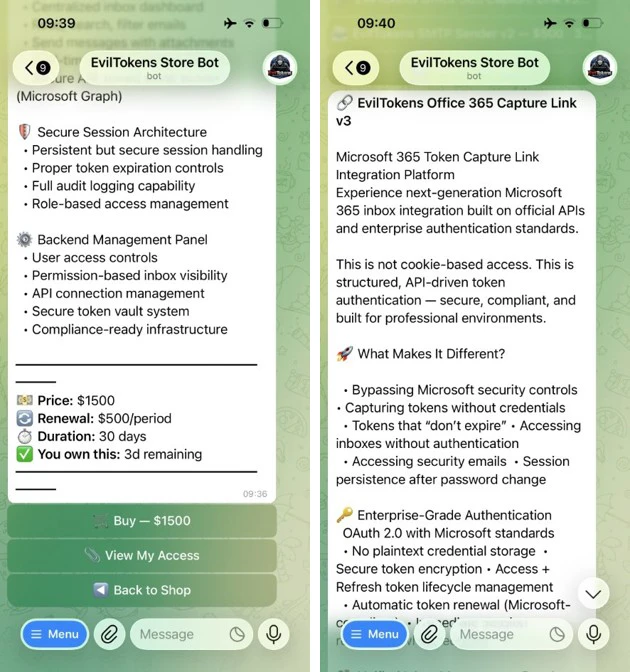
The threat actor tracked as Storm-2992 advertised and sold EvilTokens services to cybercriminals on the actor’s Telegram channels. Cybercriminals continue to gravitate towards apps like Telegram that provide anonymity, cross-platform access, file sharing, and channels for broadcasting announcements to large groups of followers. The threat actor uses Telegram to advertise their phish kit, announce updates, coordinate with their subscribers, and provide customer support.

EvilTokens phish kits are sold at $1,500 USD for initial purchase, with a monthly subscription fee of $500 for continued access to the kit and control panel. The kit provides additional products, including Antibot redirector, B2B Sender, Office 365 Capture Link, and a Simple Mail Transfer Protocol (SMTP) Sender. Each of these products has additional fees for 30 days of access.
Customer panel and campaign configuration
The EvilTokens panel provides the core components needed to support phishing campaigns, including pre‑built templates, attachment files for common lure formats, domain and hosting configuration, redirect logic, and victim tracking.
AlertInfo
| where ServiceSource =~ "Microsoft Defender for Office 365"
| join (
AlertEvidence
| where EntityType =="Url"
| project AlertId, RemoteUrl
)
on AlertId
| join (
AlertEvidence
| where EntityType =="MailMessage"
| project AlertId, NetworkMessageId
)
on AlertId
// Get the unique NetworkMessageId for the email containing the Url
| distinct RemoteUrl, NetworkMessageId
| join EmailEvents on NetworkMessageId
// Get the email RecipientEmailAddress and ObjectId from the email
| distinct RemoteUrl, NetworkMessageId, RecipientEmailAddress , RecipientObjectId
| join kind = inner IdentityInfo on $left.RecipientObjectId == $right.AccountObjectId
| distinct RemoteUrl, NetworkMessageId, RecipientEmailAddress , RecipientObjectId, OnPremSid
// Get the Url click event on the recipient device.
| join kind = inner
(DeviceEvents
| where ActionType == "BrowserLaunchedToOpenUrl"| where isnotempty(RemoteUrl)
| project UrlDeviceClickTime = Timestamp , UrlClickedByUserSid = RemoteUrl,
InitiatingProcessAccountSid, DeviceName, DeviceId, InitiatingProcessFileName
)
on $left.OnPremSid == $right.InitiatingProcessAccountSid and $left.RemoteUrl == $right.UrlClickedByUserSid
| distinct UrlDeviceClickTime, RemoteUrl, NetworkMessageId, RecipientEmailAddress, RecipientObjectId,
OnPremSid, UrlClickedByUserSid, DeviceName, DeviceId, InitiatingProcessFileName
| sort by UrlDeviceClickTime desc
EmailEvents
| where isnotempty(ThreatTypes) and DeliveryLocation in~ ("Inbox/folder","Junk folder")
| extend Name = tostring(split(SenderFromAddress, '@', 0)[0]), UPNSuffix = tostring(split(SenderFromAddress, '@', 1)[0])
| extend Account_0_Name = Name
| extend Account_0_UPNSuffix = UPNSuffix
| extend IP_0_Address = SenderIPv4
| extend MailBox_0_MailboxPrimaryAddress = RecipientEmailAddress